Smart WhatsApp

Overview

Smart WhatsApp is a conversational ordering solution that integrates directly into WhatsApp, allowing customers to interact with a restaurant or retail brand through a simple chat interface. Instead of browsing a web menu or downloading an app, customers can place their orders, receive support, and track updates through the same platform they already use daily.

The solution automates menu browsing, order placement, delivery or pickup selection, payment processing, and real-time status updates. By connecting seamlessly with the Point of Sale (POS) and back-office systems, Smart WhatsApp ensures accuracy, speed, and convenience while keeping the experience entirely chat-based and natural for customers.

Beyond ordering, Smart WhatsApp also enables personalized upselling, customer support automation, and secure handling of payments and customer data. This makes it an all-in-one conversational commerce tool that fits into the daily habits of customers.

Conversation Flow

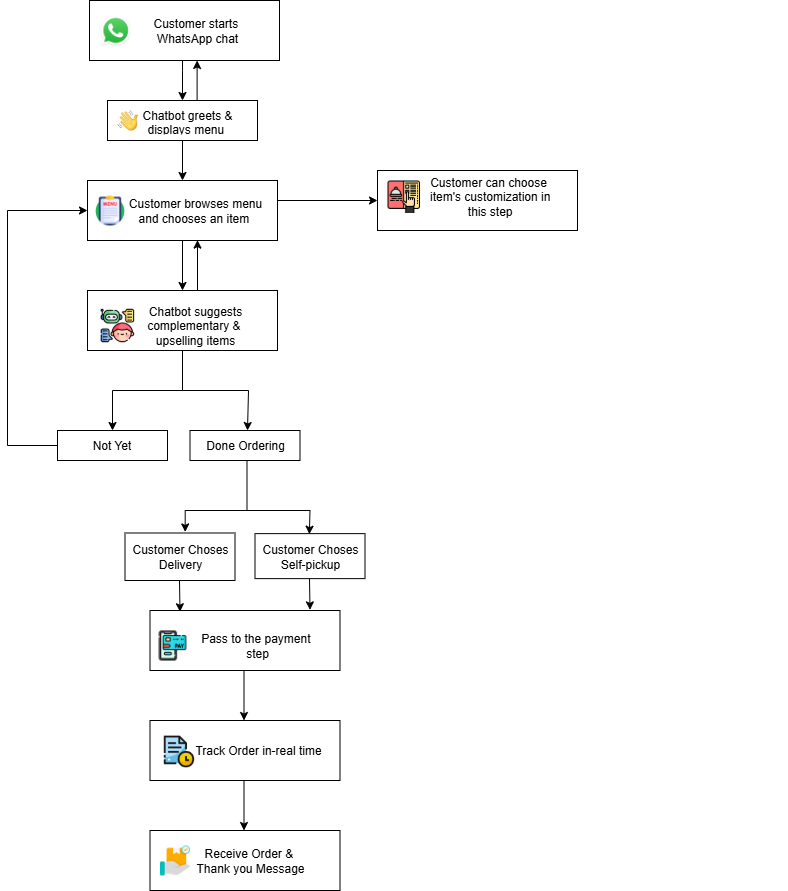
The Smart WhatsApp chatbot guides customers through a structured conversation flow designed to replicate the ordering process in a natural chat format. The steps are:

  • Greeting: The chatbot welcomes the customer and shows available menu categories.
  • Product Selection: Customers browse menu items, choose customizations, and confirm quantity.
  • Upselling: The chatbot suggests complementary products or promotions.
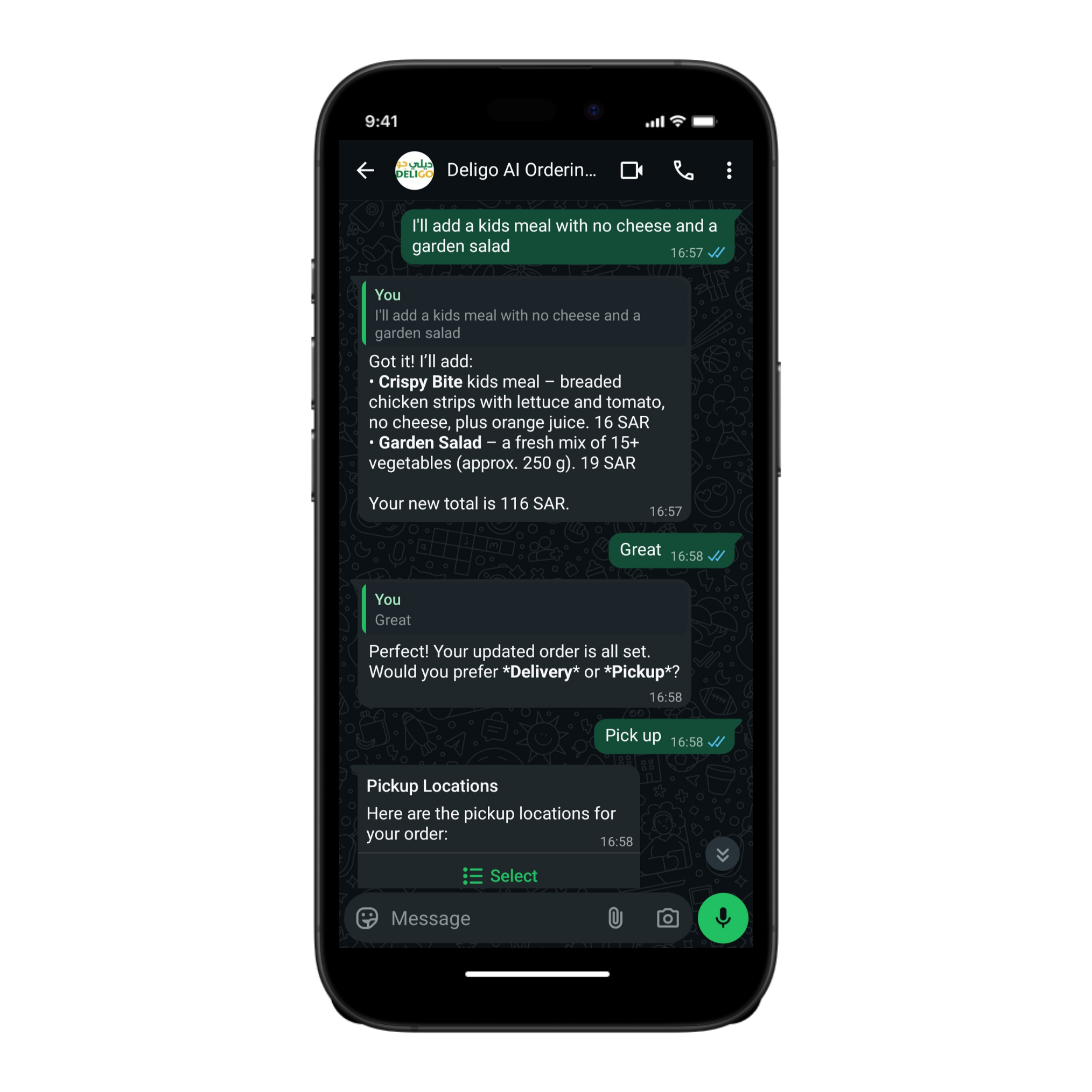
  • Delivery or Pickup: The chatbot asks for the customer’s location (for delivery) or provides branch options (for pickup).
  • Payment: The chatbot generates a secure payment link or confirms cash-on-delivery options.
  • Order Tracking: Customers receive notifications such as “Order confirmed,” “In preparation,” and “Out for delivery.”

This conversational structure minimizes effort from the customer and makes the ordering experience faster and more intuitive than traditional methods.
How it works

Ordering Through Chat

Initial Smart WhatsApp Conversation

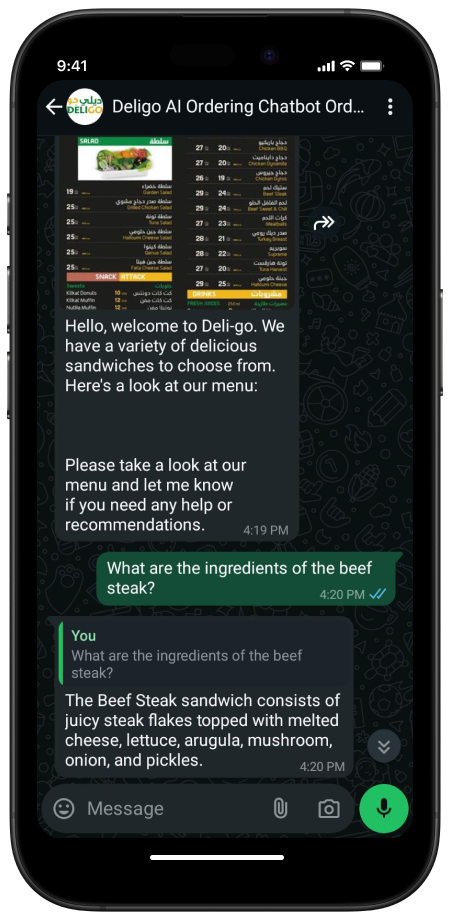
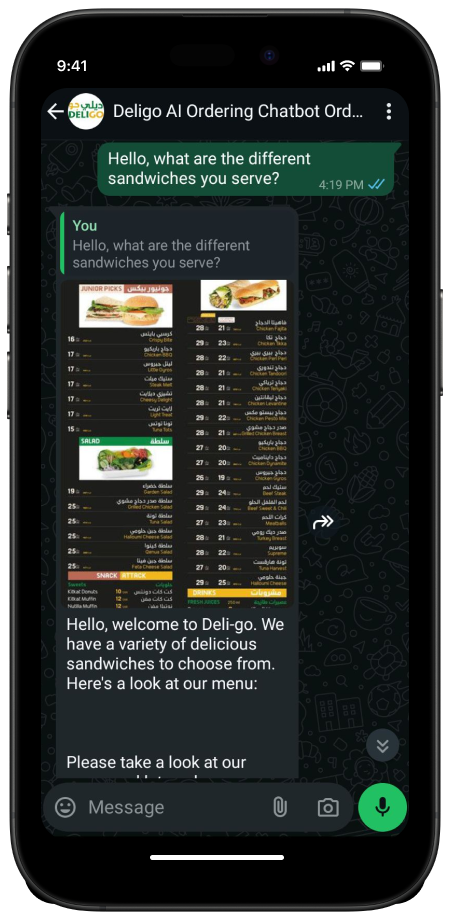
The ordering process begins when the customer initiates a conversation with the restaurant’s official WhatsApp number. Upon receiving the first message, the Smart WhatsApp chatbot automatically recognizes the intent and triggers the onboarding flow. It greets the user with a personalized welcome message, which can include the restaurant name, current offers, and a short introduction to the available services (e.g., “Order Delivery,” “Self Pickup,” or “Track Order”).

The chatbot leverages WhatsApp’s interactive messaging framework to ensures an intuitive, guided experience for all customer segments, including those less familiar with online ordering.

Behind the scenes, the chatbot communicates with the restaurant’s POS system or menu API to fetch the latest menu categories, featured products, and promotions dynamically. This ensures that every user always receives accurate data synchronized with current inventory, pricing, and seasonal offerings.

Each incoming message from the user is processed through the chat intent parser, which validates context and maintains the state of the conversation. This enables the chatbot to resume incomplete orders, recognize returning users, and continue seamlessly from where the last interaction stopped. For example, if a customer previously added items but didn’t finalize payment, the chatbot can automatically ask, “Would you like delivery or pickup ?” to proceed with the checkout.

The initial stage concludes once the customer selects a preferred menu category or begins browsing items. This structured initiation flow reduces friction, increases engagement, and ensures consistent data exchange between the chatbot interface, WhatsApp API, and the back-end ordering engine.

smart whatsapp ask

Selecting Menu Items

Once the digital menu is displayed within the WhatsApp chat, customers can select items using predefined inputs such as numeric replies or button interactions. Each menu item dynamically loads its details, including product name, description, base price, available sizes, add-ons, and modifier options. These details are fetched directly from the integrated POS or menu management system via secured API calls, guaranteeing synchronization between in-store and digital menus.

After a selection is made, the chatbot responds in real time with contextual prompts to refine the order. For instance, it may ask: “Would you like to add a drink?”, “Add extra cheese for 7 ?”, or “Select drink size: Small, Medium, or Large.” This step leverages the upselling logic, an internal recommendation model configured by the restaurant administrator which intelligently promotes complementary or high-margin items based on category rules and customer preferences.

After an order is completed, the chatbot then displays the order summary showing all chosen items, quantities, and subtotal.

smart whatsapp menu

At this stage, the chatbot also allows users to view nutritional facts such as calorie count, allergens, or ingredient lists (when configured in the menu data). This feature improves transparency and compliance with food labeling standards, while enhancing the user experience.

Once satisfied with their order, the customer is prompted to either continue shopping or proceed to checkout. Selecting checkout transitions the flow toward the next stage choosing between Delivery and Pickup where address validation, branch availability, and payment options are processed in real time.


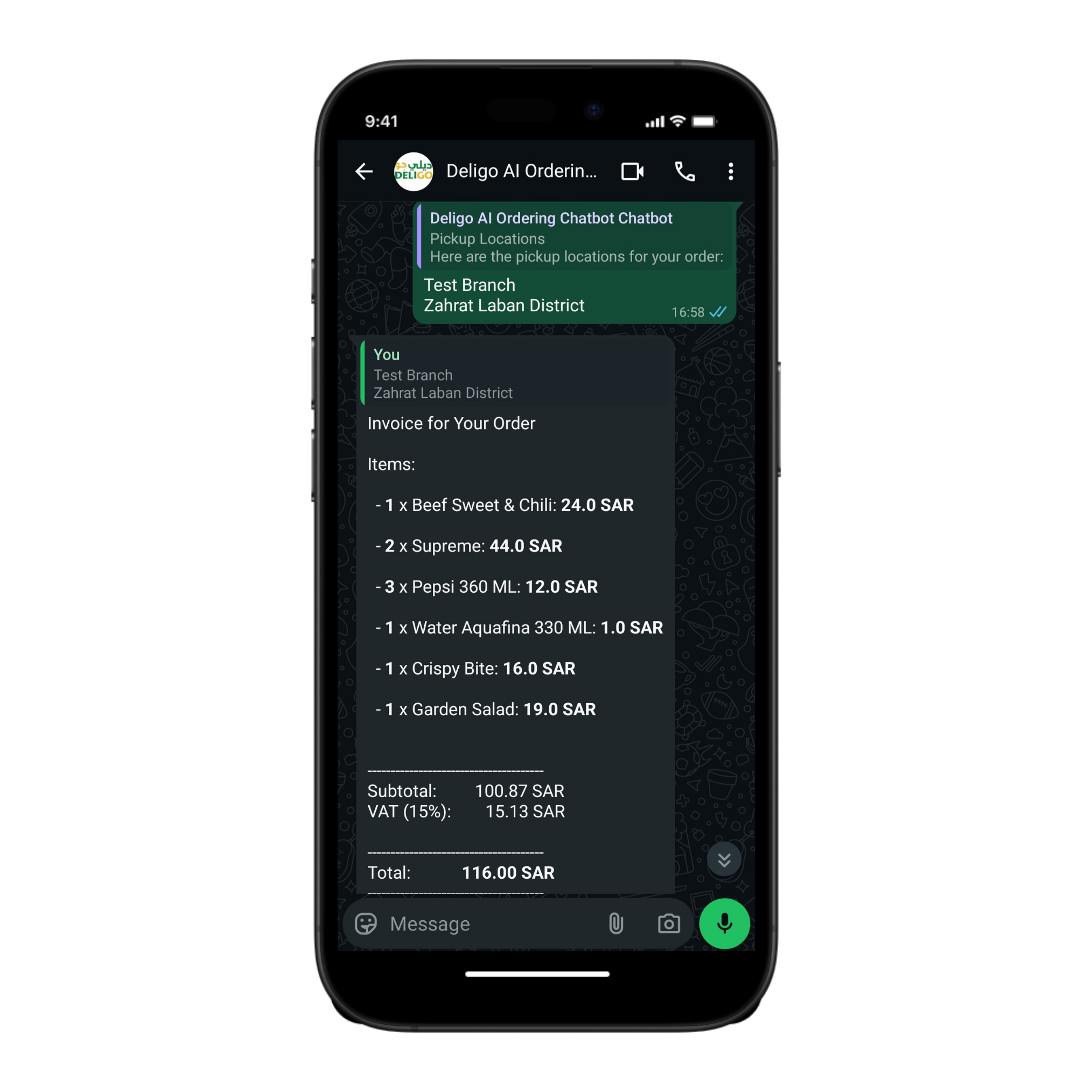
When the customer selects the Pickup option, the Smart WhatsApp chatbot prompts them to enter their preferred pickup location or branch. Once the location is provided, the system verifies branch availability in real time and confirms the order details. The chatbot then generates a clear invoice summary, listing all ordered items along with individual prices, followed by the calculated subtotal and VAT, leading to a final total payable amount. The user receives a confirmation message with pickup instructions and an order number for quick in-store collection.


Pickup Order
Pickup Order
Pickup Order Invoice


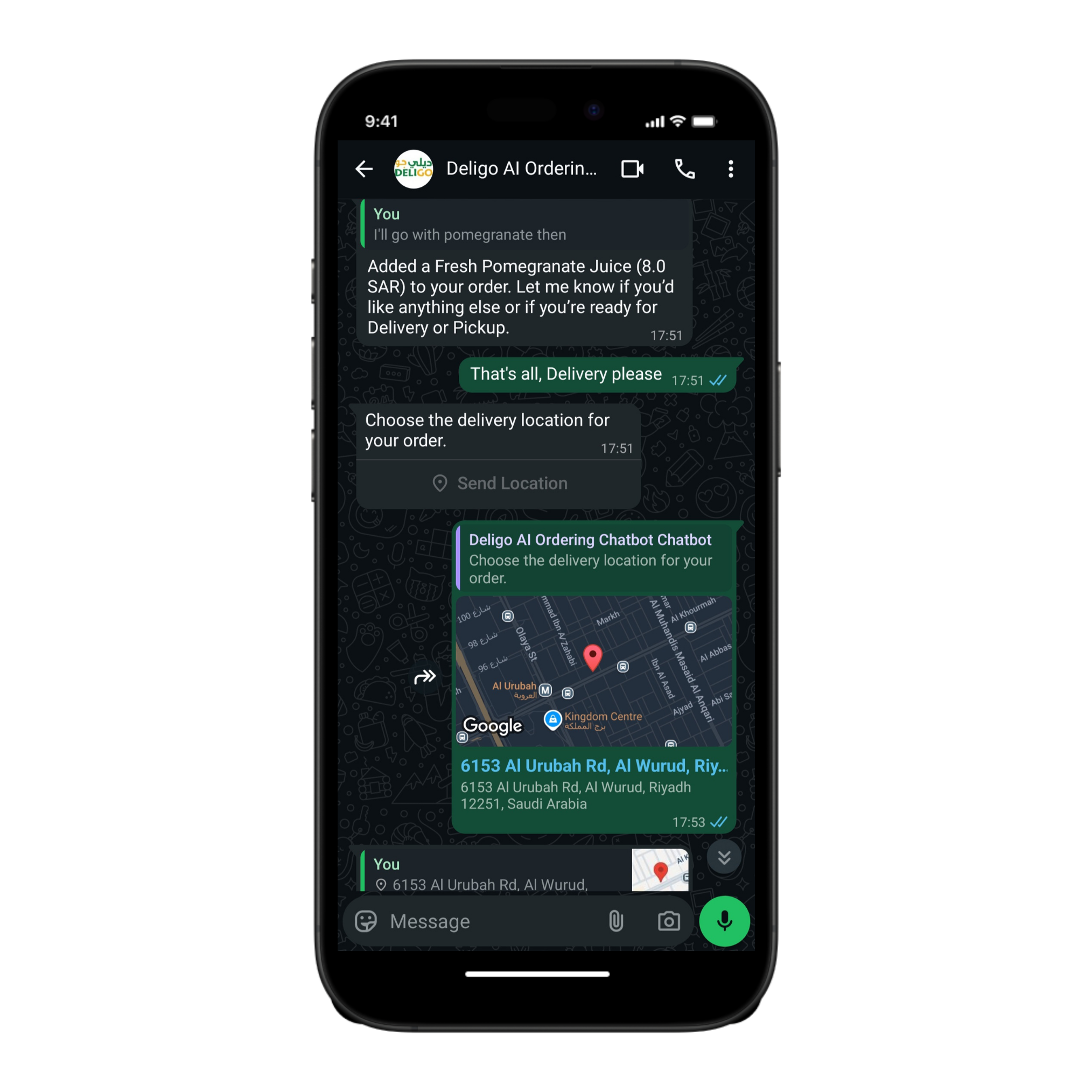
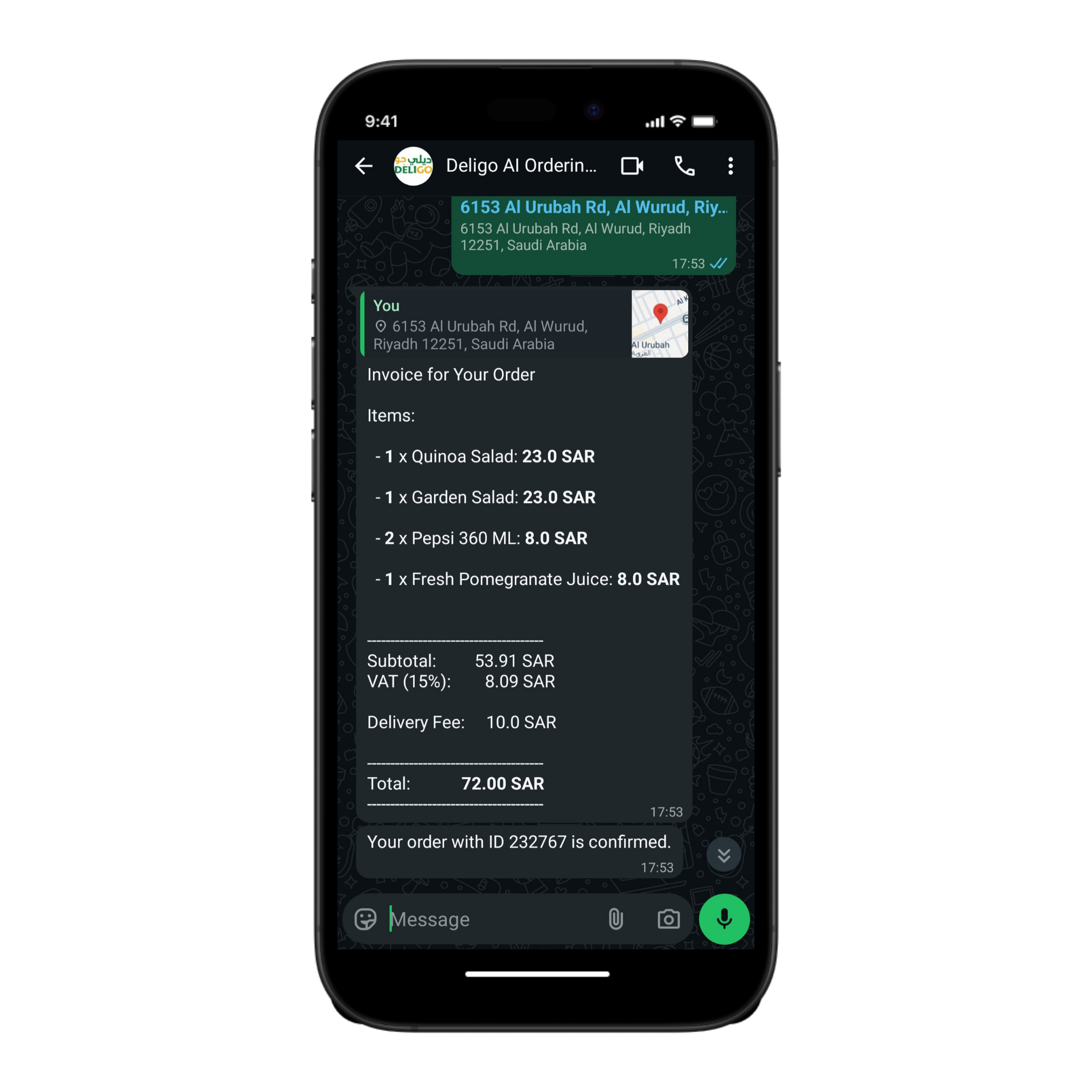
If the customer chooses the Delivery option, the chatbot requests their delivery location and uses GPS access (if enabled) to ensure address accuracy. After the delivery address is confirmed, the chatbot compiles and sends the final order invoice, showing each item’s price, subtotal, applicable VAT, and an added delivery fee. The total amount due is then displayed clearly before payment. The customer receives a confirmation message summarizing the delivery address, payment details, and estimated delivery time.


Delivery Order
Delivery Order
Delivery Order Invoice

Integrations & Features

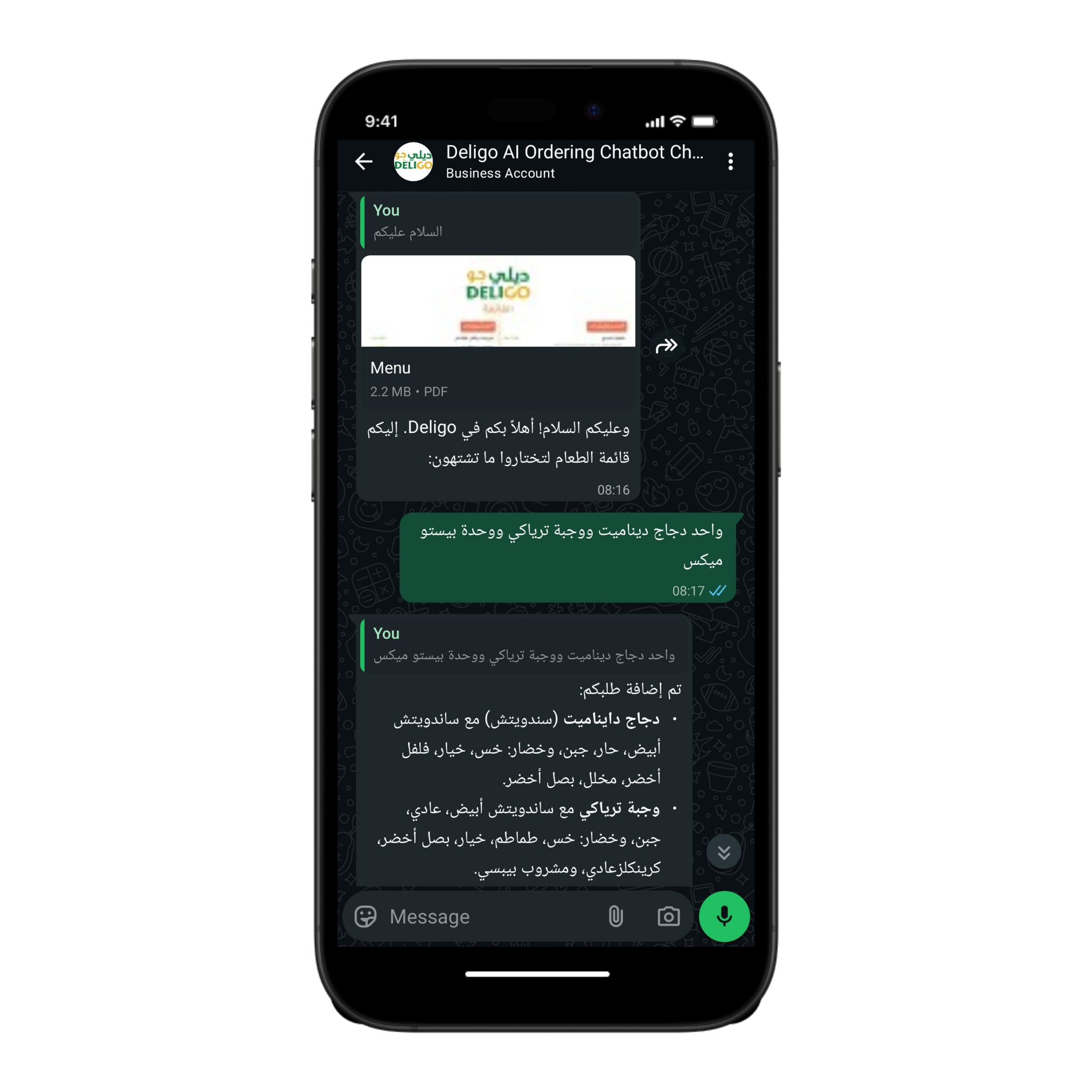
Bilingual Interaction

  • Supports full Arabic and English workflows.
  • Language detection occurs at the first customer input.
  • All templates, product names, and instructions are localized automatically.
  • Customers can switch language mid-conversation using a keyword trigger.
bilangual chat
Bilingual Chat

Point of Sale (POS)

  • Direct POS synchronization eliminates manual data entry.
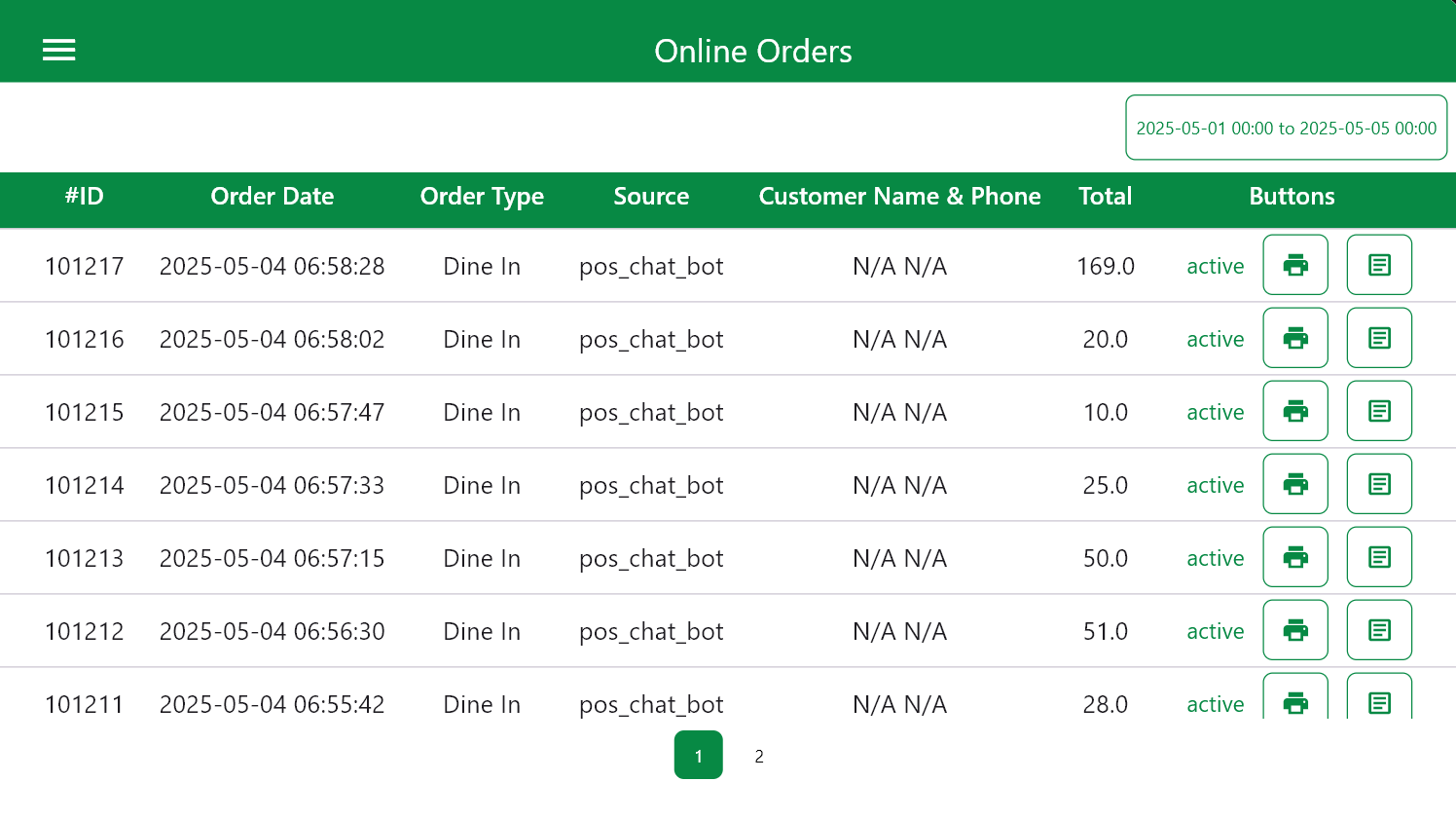
  • All order details, including items, modifiers, and totals, are automatically transferred to the POS system in real time, reducing human error and improving operational speed.


  • Menu, prices, and promotions are always up to date
  • since they are pulled dynamically from the POS database. Any change made in the POS, such as updating product prices or activating limited-time offers, is instantly reflected in the chatbot interface.


  • Automatic order registration and ticket generation.
  • Once a customer confirms an order through Smart WhatsApp, it is automatically logged in the POS system and a digital order ticket is generated for kitchen or barista preparation without manual intervention.


  • Integrated inventory and stock tracking.
  • The POS system communicates back to Smart WhatsApp, updating item availability and preventing customers from ordering out-of-stock products.


Online Ordering POS
Online Ordering POS

Payment Integration

  • Multiple payment gateways can be enabled (credit card, wallet, cash-on-delivery).
  • Payment reconciliation is automatically logged in the POS, ensuring accurate financial records.

Conclusion

The Smart WhatsApp Ordering Chatbot redefines the way customers interact with restaurants and retail brands by merging the simplicity of WhatsApp messaging with the power of integrated digital automation. Through conversational ordering, real-time synchronization with the POS system, and secure payment integration, it delivers a seamless, familiar, and efficient experience for both customers and staff.

Designed to minimize manual workload while enhancing customer engagement, Smart WhatsApp automates every stage of the ordering journey, from greeting and menu browsing to checkout and fulfillment. It ensures data consistency across platforms, reduces operational errors, and allows businesses to manage high-order volumes with greater accuracy and speed.

As part of the Smart Retail ecosystem, this solution not only improves the customer experience but also provides valuable insights through integrated analytics and performance tracking. With multilingual support, flexible configuration, and a user-friendly interface, Smart WhatsApp is a scalable, future-ready tool that bridges the gap between communication and commerce.

In essence, Smart WhatsApp transforms a simple chat into a complete digital storefront, enabling faster service, smarter operations, and stronger connections with customers anytime, anywhere.